
PSTN Integration
PSTN/SIP integration bridges traditional telephone infrastructure into an EnableX video room. Users on a landline, office desk phone, mobile phone, or SIP endpoint can join a video session as audio-only participants — no internet connection or video app required on their end.
SIP and legacy phone connections are audio-only. Video streams are not delivered to PSTN/SIP participants.
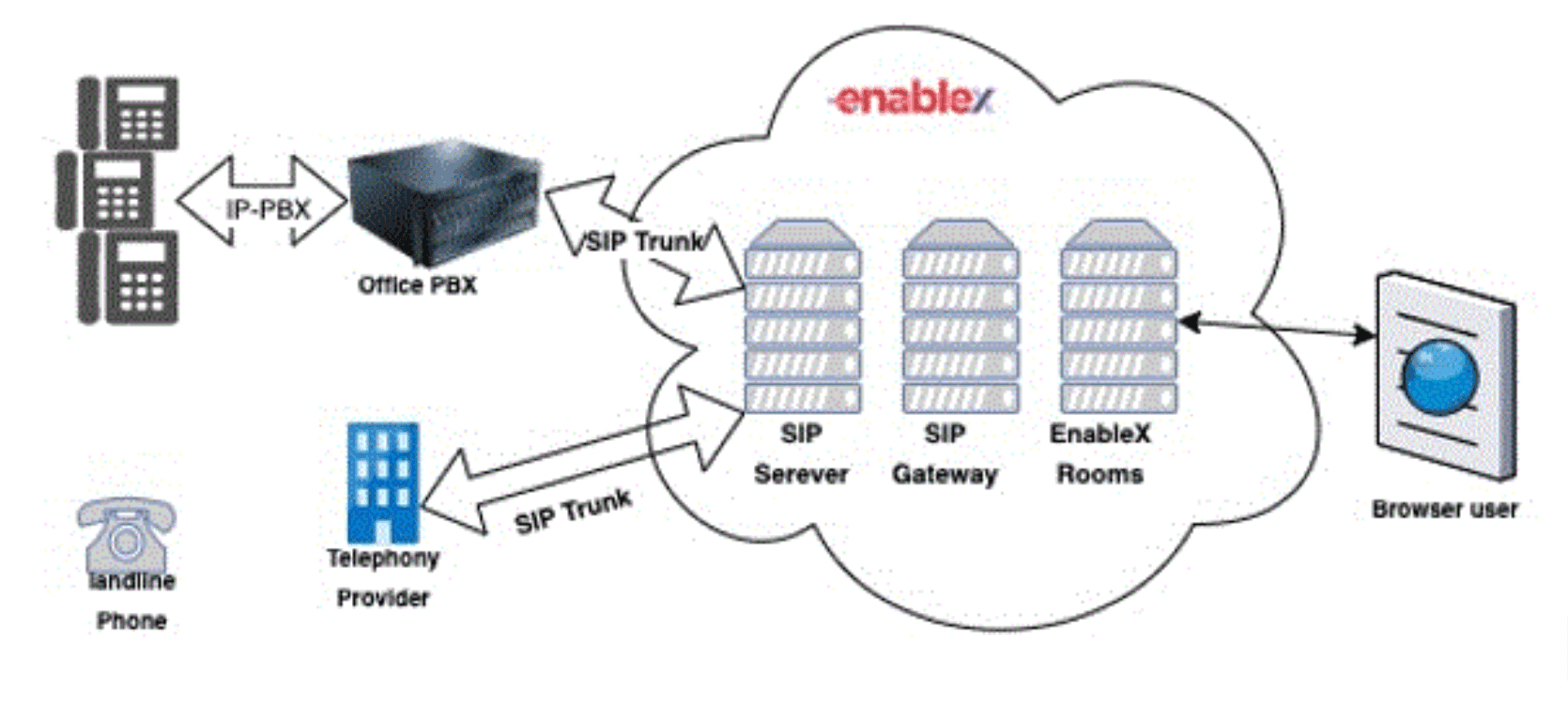
EnableX's voice platform is fully compliant with SIP RFC 3261. It acts as both a SIP gateway and a PSTN termination point, connecting traditional phone calls directly into the media layer of a live video room.
When an external caller dials in, the EnableX platform routes the call through the SIP gateway into the conference. The caller hears the room audio and their voice is mixed into the session for all other participants — exactly as if they had joined via the video app, but without video.
EnableX has partnered with Telephony Service Providers globally to support PSTN and GSM mobile network termination across multiple regions.
Configure the Room for SIP
To allow SIP/PSTN callers to join a room, you must enable SIP at room creation time by passing
the sip.enabled flag in the room creation payload:
{
  "sip": {
    "enabled": true
  }
}
When SIP is enabled, the Create Room API response includes the dial-in phone number(s) and a unique PIN that callers must enter to join the conference:
{
  "sip": {
    "enabled": true,
    "phone": [
      {
        "number": "119999999999",
        "country": "US"
      }
    ],
    "pin": 99999,
    "meeting_id": 99999
  }
}| Field | Description |
|---|---|
phone[].number |
The dial-in number for participants to call. |
phone[].country |
Country associated with the dial-in number. |
pin |
PIN the caller must enter after dialling to join the correct conference room. |
meeting_id |
Meeting identifier returned when SIP is enabled. |
There is no DID (Direct Inward Dialling) facility. Callers always dial the shared gateway number and are routed to the room via the PIN.
When a room is created with sip.enabled: true, EnableX automatically establishes
a route between the video conference and the EnableX SIP gateway. Callers dial the number
returned in the Create Room response and enter the PIN when prompted.
Enterprise SIP Infrastructure
If you operate your own SIP infrastructure (corporate PBX, SIP proxy, etc.), you can connect it directly to the EnableX SIP gateway:
- Whitelist your SIP outbound proxy — Contact EnableX support to whitelist your external SIP proxy IP. This ensures calls from your infrastructure are accepted by the EnableX server and not rejected as unauthenticated.
- SIP extension configuration — For partners with existing SIP infrastructure, the SIP extension to dial is configured during onboarding. Onboarding also supports custom IVR greetings, which can be uploaded through the EnableX portal.
Your application can instruct EnableX to initiate a new outbound call to a phone number or SIP endpoint from within an active video room. The system automatically selects the best route for the dialled number.
Outbound dial-out is initiated through the Web SDK using the
makeOutboundCall() / makeOutboundCalls() methods. The called party
picks up a standard phone call and is bridged into the video room audio.
Refer to the SDK documentation for method signatures, parameters, and callback handling:
The Caller ID shown to the called party for outbound calls depends on the Telephony Service Provider available in the dialling region.