
Browser Compatibility
EnableX Video is built on WebRTC — the open real-time communication standard supported natively by all modern browsers. This page documents which browsers and versions are supported, what limitations exist on specific platforms, and what network requirements apply for media to flow.
Web SDK: Supported Browsers
The EnableX Web SDK supports all browsers that implement WebRTC and its associated Polyfill APIs. The following browsers are officially supported:
- Google Chrome (recommended — always use the latest stable version)
- Mozilla Firefox
- Microsoft Edge (Chromium-based, v79+)
- Safari on iOS 12.1.4+ and macOS 12.1+ (upgrade to latest Web SDK for best Safari support)
- Opera
- All browsers based on Google Chromium and its derivatives (Brave, Samsung Internet, etc.)
Desktop Browser Support
The table below shows which desktop OS and browser combinations are supported for the Web SDK. We recommend always using the latest stable browser version for the best WebRTC experience.
| Platform | Chrome 72+ | Firefox 56+ | Safari 12.1+ | Opera 45+ | QQ 10.5+ |
|---|---|---|---|---|---|
| macOS 10+ | ✅ Yes | ✅ Yes | ✅ Yes | ✅ Yes | ✅ Yes |
| Windows 7+ | ✅ Yes | ✅ Yes | N/A | ✅ Yes | ✅ Yes |
| Browser | Min Version | Video | Audio | Screen Share | Notes |
|---|---|---|---|---|---|
| Google Chrome | 72+ | ✅ | ✅ | ✅ | Recommended. Best VP8 support. Always use latest version. |
| Mozilla Firefox | 56+ | ✅ | ✅ | ✅ | 30 FPS max on some configurations. See limitations below. |
| Apple Safari | 12.1+ | ✅ | ✅ | ✅ (15+) | Screen share requires Safari 15+. Multiple known limitations. See below. |
| Microsoft Edge | 79+ (Chromium) | ✅ | ✅ | ✅ | Chromium-based Edge fully supported. Legacy Edge is not supported. |
| Opera | 45+ | ✅ | ✅ | ✅ | Chromium-based. |
| Brave | 1.0+ | ✅ | ✅ | ✅ | Chromium-based. Disable Brave Shields if WebRTC issues arise. |
Mobile Browser Support
Mobile support depends on both the device's hardware capabilities and the codec implementation of the browser. The key considerations for each mobile platform are:
- Android 4.1+: The Web SDK supports Chrome 58 and later. The recommended minimum is Chrome 72+. EnableX recommends VP8 video compression — Android's H.264 support is hardware-dependent and is no longer supported by EnableX.
- iOS 11+: WebRTC is supported via Safari. However, iOS 11 has many limitations and issues — EnableX does not recommend browser-based development for iOS 11. Use the iOS native SDK instead.
- iOS 12.2+ / macOS 10.14.4+: VP8 is available in Safari 12.1, enabling a consistent WebRTC experience.
| Browser / Platform | Video | Audio | Screen Share | Notes |
|---|---|---|---|---|
| Chrome on Android (58+) | ✅ | ✅ | ✅ | Full support. Use Chrome 72+ minimum. VP8 recommended. |
| Safari on iOS 12.2+ | ✅ | ✅ | ✅ (iOS 15+) | All iOS browsers use WebKit engine. Screen share via ReplayKit (iOS 15+). |
| Firefox on Android | ✅ | ✅ | ❌ | No screen share support on mobile Firefox. |
| Samsung Internet | ✅ | ✅ | ❌ | Chromium-based. Limited screen sharing support. |
| Android WebView | ✅ | ✅ | ❌ | Requires explicit WebRTC permissions in the app manifest. |
| WKWebView (iOS 14.5+) | ✅ | ✅ | ❌ | WebRTC supported from iOS 14.5. Limited camera selection within WebView context. |
Known Limitations
Due to differences in browser engine implementations, some WebRTC features behave differently across platforms. The limitations below are known and documented — design your application to handle these gracefully.
Chrome / Chromium
- While Chrome 72+ is the minimum, some APIs may only work correctly on specific newer versions. Always recommend users use the latest stable Chrome.
- Chrome 84 on macOS (H.264 frame rate drop): When using H.264, the frame rate may drop significantly. This is a known Chromium issue (Issue 1088650). Since EnableX has discontinued H.264 support and defaults to VP8, this issue does not affect normal EnableX sessions. However, if your application previously forced H.264, migrate to VP8.
- Tab capture for screen share requires Chrome 72+.
Safari on iOS and macOS
- Safari 11: Only supports video resolutions of 480p and above.
- Safari 12.1 and earlier: Only supports H.264. VP8 became available in Safari 12.1 on iOS 12.2 and macOS 10.14.4.
- Safari 13: Users may not be able to hear other users in some configurations.
- Safari 14.0.1 / iOS 14.2: Audio may stutter. Upgrade to the latest Safari version.
addTrackandremoveTrackmethods are not supported in Safari.- Dual stream mode is not supported on Safari.
- Quality statistics APIs (e.g.
getLocalAudioStats) may return 0 for some properties such asRecordingLevelandSendLevel.
Device permission limitations on Safari:
- Obtaining output device information (e.g. audio output) is not supported —
getPlayoutDevicesandsetAudioOutputare not available. - Audio is not available in stream playback if Auto-Play is disabled. Fix: call
navigator.mediaDevices.getUserMedia()before playing a stream to obtain device permissions.
iOS-specific issues:
- Audio routing may change randomly — audio may switch between speakerphone and earpiece unexpectedly.
- The volume of a remote user may change randomly on iOS 13.
- Safari on iOS does not support the
getAudioLevelmethod. - Calling
getUserMediatwice for the same media type may mute or black-out the first track. - On iOS 13, switching to another app that uses microphone or camera (Siri, a phone call, etc.) and then returning may cause audio or video capture to fail.
- After an audio session interruption (mute/unmute, Siri, incoming call), a user may stop hearing remote participants until the page is refreshed.
Firefox
- Changing the default frame rate (30 FPS) is not supported on Firefox.
-
Setting the video profile (resolution) may not take effect on:
- MacBook Pro (13-inch, 2016, Two Thunderbolt 3 ports)
- Windows 10 (MI)
- Quality statistics APIs may return 0 for some properties (same limitation as Safari).
- Apple M1 Macs: Firefox does not support H.264 on M1. Since EnableX has discontinued H.264, use VP8 (which is EnableX's default).
- When communicating with some non-Firefox SDKs, the video stream may appear rotated on Firefox.
Compatibility Matrix
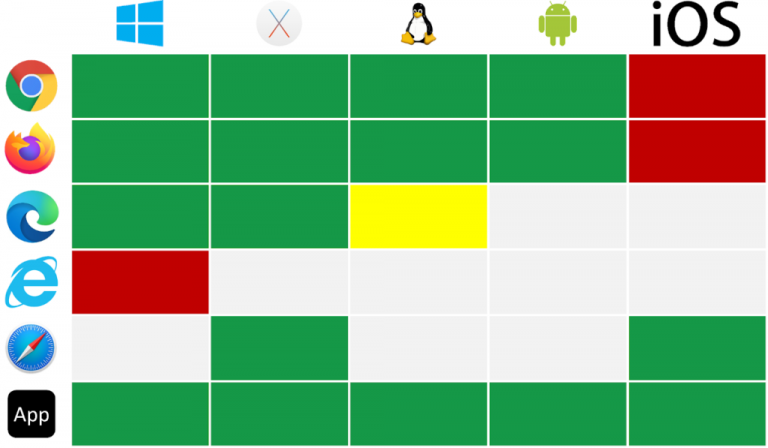
WebRTC Support: Browser & Device
The chart below shows which browser and device combinations support WebRTC natively. Use this as a quick reference when determining whether a target environment is compatible with EnableX Video.
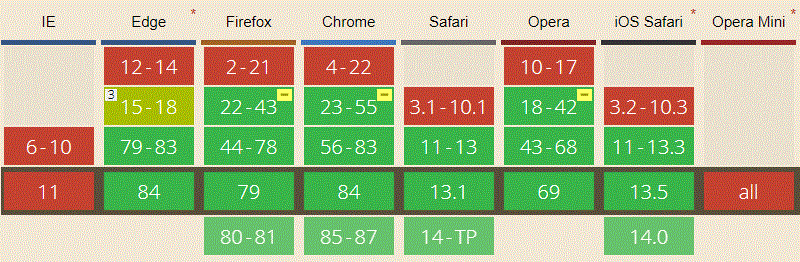
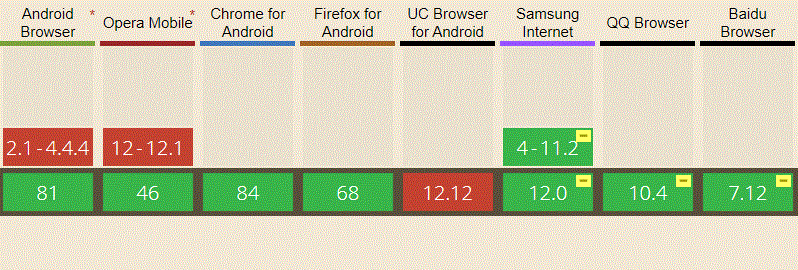
WebRTC Support: Browser Version
The charts below show which specific browser versions introduced WebRTC support, helping you set minimum version requirements.
Screen Share Support: Browser & OS
Screen sharing support varies significantly across operating systems and browsers. The table below documents the current state. "Receive Only" means the participant can view a screen share stream but cannot initiate one from that platform.
| OS / Browser | Chrome 72+ | Safari | Firefox | Edge |
|---|---|---|---|---|
| Windows | ✅ Yes | ✅ Yes | ✅ Yes | ✅ Yes |
| macOS | ✅ Yes | ✅ Yes (15+) | ✅ Yes | ✅ Yes |
| Ubuntu / Linux | ✅ Yes | N/A | ✅ Yes | — |
| Android | Receive Only | — | Receive Only | — |
| iOS 12+ | N/A | Receive Only | — | — |
Native SDK Platform Support
For the best performance, battery efficiency, and platform integration — especially on mobile — EnableX provides native SDKs that use the platform's built-in WebRTC engine directly. These bypass browser limitations entirely.
| Platform | Min OS Version | Download / Install |
|---|---|---|
| Android | API 21 (Android 5.0 Lollipop) | Download SDK → |
| iOS | iOS 12.0+ | Download SDK → |
| React Native | RN 0.60+ | npm install enx-rtc-react-native |
| Flutter | Flutter 2.0+ | pub.dev → |
| Cordova / Ionic | Cordova 10+ | Download SDK → |
Firewall & Network Requirements
For video sessions to establish and media to flow, the following ports must be accessible outbound from user devices. If these are blocked, the EnableX TURN server provides fallback — but always opening the UDP range gives the best quality and lowest latency.
| Protocol | Port Range | Direction | Purpose |
|---|---|---|---|
| TCP | 443 | Outbound | HTTPS signalling & TURN relay over TLS |
| UDP | 3478 | Outbound | STUN / TURN |
| UDP | 30000 – 35000 | Outbound | RTP media streams (EnableX media servers) |
| TCP | 3478 | Outbound | TURN fallback when UDP is blocked |
*.enablex.io domains and open UDP 30000–35000 outbound. When UDP is fully blocked,
EnableX TURN relay over TCP 443 maintains session connectivity — at slightly higher latency.